


TheGrint | Golf Handicap & GPS
4.51.29K Reviews
App Specs
- Version
- Varies with Device
- Updated On
- License
- Free
- Downloads
- 1,000,000+
- Developer
- Grint LLC
- Categories
- Sports
- Platform
- Android, iOS
Screenshots
 Analysis by AppCompare
When I choose a golf app, I care less about a long feature list than whether it helps before, during, and after a round without making play feel like admin. TheGrint is built around that practical loop: finding course information, recording scores, following a handicap, and reviewing performance later. It is a sports app from Grint LLC, and its focus makes it most useful to golfers who want their round and their longer-term progress kept together.
What to decide before you switch
The first question is what you actually want from a golf app. If you mainly need a place to jot down a score, a notes app or paper card may be enough. If you want distance guidance while playing but have no interest in handicap tracking or reviewing stats, a dedicated GPS rangefinder app may feel simpler. I see TheGrint as a stronger fit when those jobs belong in one routine rather than in several separate tools.
That distinction matters because an app can add friction even when it has useful features. You need to be willing to enter scores consistently and to glance at a screen during a round. If you prefer to leave your phone in your bag, or your club already has a scoring process you like, TheGrint may not improve your day. I would decide based on the habit you want to build, not on the number of options in a menu.
The app has been available since March 4, 2013, and it has a 4.7 average from around 5,300 ratings, alongside roughly 1,200 written reviews. More than a million people have installed it, which suggests it has found a substantial audience among golfers. It is free to start, rated for Everyone, and offers in-app purchases ranging from about a dollar to just under $200 per item, so I would check which tools matter to me before paying for an upgrade.
First Impressions
I’ll be honest, when I first heard about TheGrint | Golf Handicap & GPS, I was a bit skeptical. There are so many golf apps out there, and it’s hard to know which ones actually deliver. But right from the start, TheGrint impressed me with its sleek design and intuitive interface. It’s one of those apps that just feels right when you use it. You know what I mean?
The setup was a breeze. After downloading it from the app store, I quickly created an account, entered my golfing details, and was ready to hit the greens. The app’s registration process is straightforward, and they don’t bombard you with unnecessary questions. You get what you need and can dive right into the action.
Features Galore
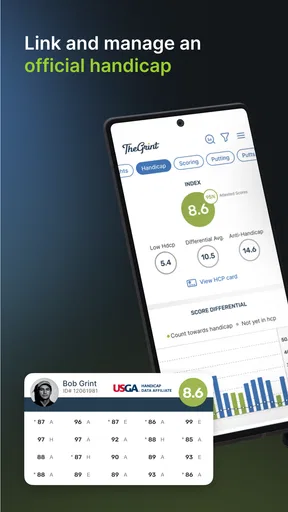
Now, let’s talk features because this app is packed with them. One of the highlights is its handicap tracking. For those who take their game seriously, keeping track of your handicap is crucial, and TheGrint makes this incredibly easy. You can log your scores, and it automatically calculates your handicap index. Plus, it syncs with the USGA, ensuring your handicap is legit.
Worth Reading Before You Choose

EA SPORTS FC Mobile 26 Is a Bigger Football Game, but It Takes Time

Flipboard Shows What News Apps Must Do Beyond the Feed

Switching to Android Auto Means Rethinking Your Driving Routine

Google Calendar Makes a Crowded Week Easier to Manage

Ludo King Makes the Most of the Minutes Between Plans

Baby Panda World Brings Quick Play to Modern Phones, but Its Game Library Feels Busy
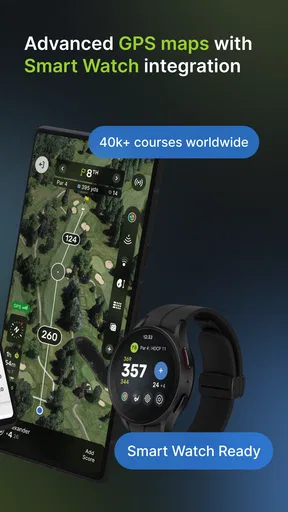
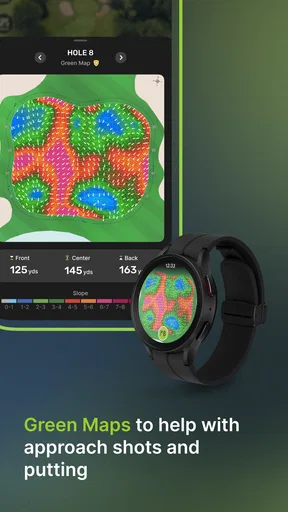
Another standout feature is the GPS rangefinder. Imagine having a caddy in your pocket! The GPS function provides accurate distances to the green, hazards, and more for thousands of courses worldwide. I found this particularly helpful in strategizing my shots and improving my course management.
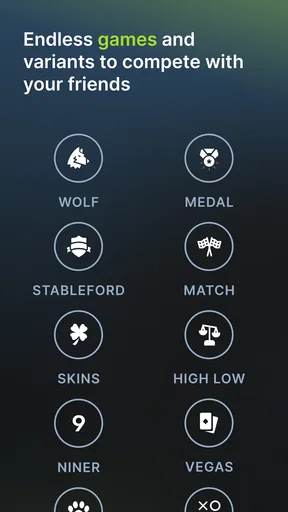
The app also offers a social component. You can connect with friends, share scores, and even engage in friendly competitions. This aspect adds a fun, community feel to the app, making it a perfect companion for both solo and group rounds.
User Experience
Using TheGrint on the course is seamless. The app runs smoothly, with quick load times and no noticeable lag. The interface is clean and well-organized, ensuring you don’t waste time fiddling with settings when you should be focusing on your swing.
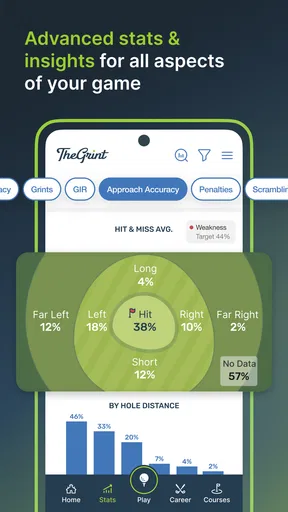
TheGrint also provides detailed statistics on your game. You can analyze your performance over time, looking at key metrics like fairways hit, greens in regulation, and putting accuracy. For data geeks like me, this is pure gold. It’s like having a personal coach analyzing your game, helping you identify areas for improvement.
Making the most of a round
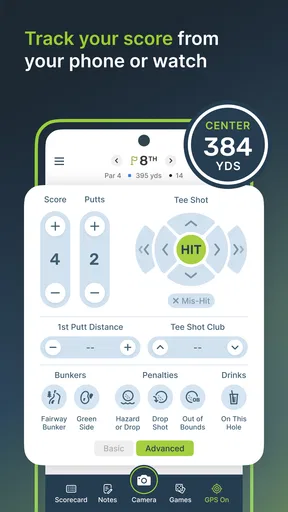
A useful way to approach scoring is to make it part of the routine rather than a job for the clubhouse afterward. I would enter each hole while the details are fresh, then take a moment after the round to check that the scorecard reflects what happened. That simple habit makes the handicap record more dependable and gives the stats context; a string of missed greens is more useful to review when I remember whether approach shots or awkward lies caused the trouble.
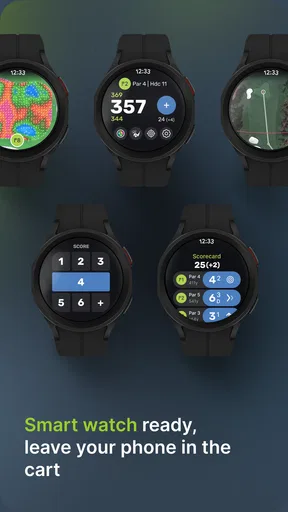
For a typical weekend round, I would check the course and GPS view before the first tee, then use distance guidance selectively rather than consulting the phone before every shot. It is especially helpful when I am unfamiliar with a hole and want a general sense of what lies ahead. On a course I know well, I may rely more on my usual club choices and use GPS only when a target or hazard is unclear. That keeps the phone a tool rather than the center of the round.
One practical trade-off is that score tracking is only as informative as the information I enter. If I record a total but skip the details that support the app’s statistical analysis, I should not expect a precise picture of where my game is changing. I would start with a manageable level of tracking, keep it consistent for several rounds, and only add detail if I am genuinely going to use the resulting trends. More fields are not automatically better if they slow down play.
Where it stands against other golf tools
Compared with a basic scorecard app, TheGrint aims to connect the score with handicap and later analysis, so it makes more sense for someone who wants a record that develops over time. A standalone GPS tool can be a better match for a golfer whose only priority is on-course distance information. Meanwhile, a club’s own scoring system may be preferable when the group already uses it and everyone wants to keep the round in one shared place. I would not switch simply because another app has more options; the real gain has to be a better fit for how I play.
The difference from a paper card is less about replacing handwriting and more about what happens after the round. Paper is immediate and does not ask me to handle a phone, but it does not automatically organize a history of scores and stats. TheGrint is more appealing if I like reviewing progress and keeping a handicap current. If I play only occasionally and do not care about that record, paper remains a perfectly sensible alternative.
There is also a social choice to make. Connecting with friends can give a group a shared way to follow scores and make friendly competition part of the experience. But golfers who prefer a quiet round, or who do not want another social feed in their routine, can treat that as an optional extra rather than the reason to install it. I would use the social side when it adds something to a regular group, not out of obligation.
Small habits that make the app more useful
Before relying on GPS for a shot that matters, I would give the course view a quick check and compare its guidance with what I can see on the ground. A phone-based distance is a reference, not a decision-maker: the lie, wind, elevation, and my own reliable carry distances still matter. This is a good way to avoid treating a convenient number as a guarantee, especially when a miss could leave a difficult next shot.
I would also separate practice goals from score goals when reviewing statistics. A round played while testing a new club or working on a particular shot may produce a different score pattern from a normal competitive round. Remembering that context prevents me from reading every dip in a metric as a decline in ability. The stats are most useful as prompts for reflection, not as a verdict on one afternoon.
For a group, it helps to agree before teeing off who is entering scores and how the group wants to use the app. Otherwise, everyone may assume someone else is keeping the record, or players may spend time comparing screens between holes. One person handling the shared task can keep the pace more natural; a solo golfer can take the same approach by entering information during a quiet moment rather than while others are ready to hit.
Room for Improvement?
No app is perfect, and while TheGrint offers a lot, there are a few areas where it could improve. Occasionally, the GPS feature can be slightly off, but it’s nothing that a quick recalibration can’t fix. Also, while most features are free, some advanced options require a subscription. It’s not a deal-breaker, but something to keep in mind if you’re looking to access everything the app has to offer.
That occasional GPS uncertainty is worth taking seriously rather than brushing aside. I would not use a phone reading as the sole basis for club selection, particularly if the position looks inconsistent with the hole or the visible target. A dedicated rangefinder or another distance method can suit golfers who want a more direct, single-purpose tool. The app’s broader value is the combination of course guidance and record keeping, not a promise that every reading will settle every shot decision.
The other friction is commitment. A handicap and useful trend history depend on regularly recording rounds, so a golfer who forgets to enter scores may end up with an incomplete picture. Likewise, paid options can change the value calculation: I would first use the free experience to identify a specific need, then decide whether an upgrade is worth its cost to me. The available purchase range is broad, so I would not assume every golfer needs the same paid extras.
Who should choose it—and who may not
I would recommend TheGrint to golfers who play often enough to care about a handicap, enjoy seeing patterns in their rounds, or regularly play with friends and want scoring to be part of a shared routine. It can also suit someone returning to golf who wants a structured way to notice whether practice is translating into better decisions and results. The key is being willing to record rounds, not being an expert or a low-handicap player.
I would steer a very casual golfer toward a simpler scorecard if all they want is to remember who won a single outing. I would also consider a dedicated GPS device or app if distance measurement is the only need and I do not want social or statistical features. And if phone use distracts me from the people I am playing with, no amount of tracking is worth making the round less enjoyable. In those situations, the simpler option is the better one.
As a decision, switching is easiest when I begin at the start of a new run of rounds rather than expecting an old paper record to turn into a complete digital history. I would keep any previous scores I still care about separately and let the app build a consistent record from there. That avoids the false expectation that a new tool will instantly explain my whole game. The benefit grows with steady use, so I would judge it after I have enough rounds recorded to make the statistics meaningful.
Final Thoughts
Overall, TheGrint | Golf Handicap & GPS is a fantastic tool for golfers of all levels. Its comprehensive features, user-friendly interface, and strong community aspect make it a must-have for anyone serious about improving their game. Whether you’re tracking your handicap, using the GPS for precise distances, or simply enjoying the social features, TheGrint delivers a well-rounded experience that enhances your time on the course.
If you haven’t already, give it a try. It might just become your new favorite golfing companion. Happy golfing!
Pros
- Intuitive GPS interface for easy navigation.
- Accurate handicap tracking and updates.
- Comprehensive course database worldwide.
- Detailed stat tracking for game improvement.
- Integrated social features for community interaction.
Cons
- Requires a stable internet connection.
- Some features locked behind a paywall.
- Occasional GPS accuracy issues.
- Interface can feel cluttered for beginners.
- Limited offline functionality.
FAQs for TheGrint | Golf Handicap & GPS
What features does TheGrint offer for golfers?
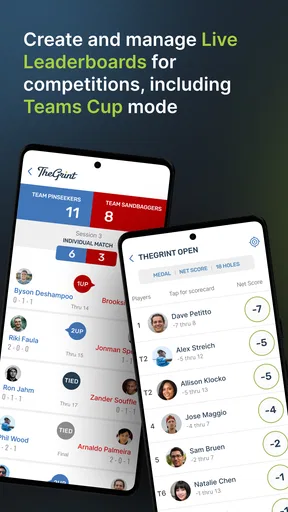
TheGrint provides a comprehensive set of tools for golfers, including GPS rangefinder, score tracking, and a USGA-compliant handicap calculator. It also offers detailed performance statistics, live leaderboards for tournaments, and a social platform to connect with other golfers. These features make it a versatile tool for golfers of all levels.
Is TheGrint app free to use?
TheGrint offers both free and premium versions. The free version includes basic features such as score tracking and handicap calculation. However, to unlock advanced features like the GPS rangefinder, detailed stats, and some social features, users need to subscribe to the Pro membership, which comes with a monthly or yearly fee.
How accurate is the GPS rangefinder in TheGrint?
TheGrint's GPS rangefinder is known for its accuracy, providing precise distance measurements to various points on the golf course. The app uses your device's GPS capabilities to deliver real-time data, which is regularly updated to ensure reliability. However, as with any GPS app, accuracy can vary based on your device and satellite signal strength.
Can I track my golfing performance over time with TheGrint?
Yes, TheGrint allows you to track your performance over time. It provides detailed statistics on various aspects of your game, such as fairways hit, greens in regulation, and putting averages. This data helps golfers analyze their strengths and weaknesses, enabling them to make informed decisions to improve their game.
How does TheGrint handle social interactions among users?
TheGrint has a robust social platform that allows users to connect with friends, share scores, and participate in challenges or tournaments. Users can create groups, compare stats, and even engage in friendly competitions. This social aspect fosters a community experience, making golf more engaging and fun for its users.


